
Buying a wireless GPS tracker seems straightforward until you start comparing battery backup claims. One device promises long battery life, another focuses on real-time tracking, and a third advertises a rechargeable battery designed for weeks of use. How do you know which one is right for you?
The answer depends on more than the battery itself.
A wireless GPS tracker that sends frequent location updates throughout the day will generally consume more power than one that spends most of its time stationary. Network coverage, GPS signal conditions, temperature, movement and the way you use the device can also affect how often it needs charging.
This matters whether you want to track a valuable parcel, monitor equipment, protect business assets, or keep an eye on the location of a family member during daily travel.
In this guide, we will explain how wireless GPS tracker battery life works, what buyers should check before purchasing, and how to get the most out of a rechargeable tracker.
How Long Does a Wireless GPS Tracker Battery Last?
There is no single battery life figure that applies to every wireless GPS tracker. Some devices may need charging after a few days of intensive tracking, while others can operate for considerably longer when configured for less frequent reporting. The actual result depends on the hardware, battery capacity, tracking settings and operating conditions.
For example, SPLAKDHN publishes a typical battery backup estimate of 7–20 days for its two rechargeable wireless GPS tracker models discussed in this guide. Actual battery life depends on tracking frequency, network conditions and usage.
You can explore the product specifications here:
These devices serve different purposes. The magnetic asset tracker is designed for cargo, containers, vehicles, machinery and other movable assets. The personal wireless tracker is intended for use with items such as school bags, luggage and other personal belongings, as well as location-monitoring needs involving family members.
The important point is that a published battery estimate should be treated as a guide, not a guarantee for every situation.
If you need frequent location updates throughout a long working day, your charging requirements may be different from those of someone who checks the location of a parked asset periodically.
Why Does Battery Life Vary Between Wireless GPS Trackers?
A GPS tracker does more than store energy in a battery. It determines its location, processes information and transmits that information through a mobile network so you can view it on a tracking application or web platform.
Each of these activities uses power.
1. How Frequently the Tracker Sends Location Updates
Tracking frequency is one of the most important factors buyers should understand.
Imagine that you have placed a wireless GPS tracker inside a shipment travelling between two cities. You may only need to check its location at intervals during the journey. Now imagine a fleet manager who wants frequent updates while a vehicle is moving.
The second situation can require the tracker to perform location fixes and communicate more often.
More frequent reporting generally increases power consumption. Less frequent reporting can extend battery life, although it may also mean that the location history contains fewer updates and the displayed route is less detailed.
Before purchasing, consider what you actually need:
- Frequent location updates for active monitoring.
- Periodic updates for routine asset checks.
- Movement alerts to help identify unexpected activity.
- Location history for reviewing previous journeys.
The best configuration is the one that balances the level of monitoring you require with acceptable charging intervals.
2. GPS Signal Strength
A tracker needs a suitable GPS signal to determine its position. Conditions are usually more favourable in open areas than in places where buildings, roofs or other obstructions interfere with satellite reception.
For example, a tracker inside a metal shipping container or deep inside a building may have more difficulty obtaining a GPS fix than one with a clearer view of the sky.
When positioning takes longer or the device repeatedly attempts to obtain a location, power consumption can increase.
This is worth remembering when tracking equipment kept inside warehouses, enclosed cargo areas or underground parking facilities.
A tracker may still be useful in these environments, but its positioning performance and battery life can differ from what you experience outdoors.
3. Mobile Network Coverage
GPS positioning and mobile connectivity perform different jobs.
GPS helps the device determine its location. The mobile network allows it to send that information to the tracking platform so you can view it remotely.
When cellular coverage is weak, a tracker may use additional power attempting to establish or maintain a connection, or retrying data transmission.
This can happen during travel through remote areas, inside certain buildings or in locations where mobile reception is unreliable.
For Indian buyers, it is sensible to consider the routes and locations where the device will actually be used. A tracker operating mainly in areas with good network coverage may behave differently from one travelling through areas with inconsistent reception.
Check SIM compatibility and network availability before using a wireless tracker in a new region. International tracking also depends on compatible connectivity and available mobile network coverage.
4. Movement and Daily Usage
How often a tracker moves can influence how much power it consumes.
A magnetic GPS tracker attached to a container that remains stationary for several days may have a different usage pattern from one fitted to a vehicle that travels for hours every day.
Similarly, a personal tracker carried in a school bag may experience a different pattern of movement and location reporting from one left inside luggage that is rarely moved.
Some GPS trackers offer power-saving or sleep functions. Where supported, these features can reduce unnecessary activity when the device is stationary.
However, sleep behaviour varies by model. Do not assume that every wireless GPS tracker automatically enters the same low-power state or provides identical movement-triggered tracking.
Check the device specifications and operating instructions before relying on a particular power-saving feature.
5. Battery Capacity and Device Design
Battery capacity is another important factor, but it should not be considered in isolation.
A larger battery can store more energy. However, the final operating time also depends on the power requirements of the GPS receiver, mobile communication hardware and other device functions.
Two trackers with similar battery capacities may therefore deliver different results.
Device size also matters. A compact tracker intended to fit inside a small personal bag may have different design constraints from a larger magnetic tracker built for business assets.
When comparing products, look beyond battery capacity and ask how the device is expected to be used. A realistic battery estimate under a clearly described operating pattern is more useful than a capacity figure alone.
6. Temperature and Environmental Conditions
Batteries can behave differently in very hot or cold conditions.
For example, a tracker exposed to direct sunlight inside a vehicle during a hot Indian summer may experience a different environment from one kept indoors. Very low temperatures can also affect battery performance.
Follow the manufacturer’s operating and charging temperature guidance. Avoid leaving rechargeable devices in extreme heat, exposing them to water unless they are rated for it, or charging them in conditions prohibited by the manufacturer.
Good handling helps protect the battery and reduces the risk of premature damage.
Real-World Example: GPS Tracking for Pipeline Patrols
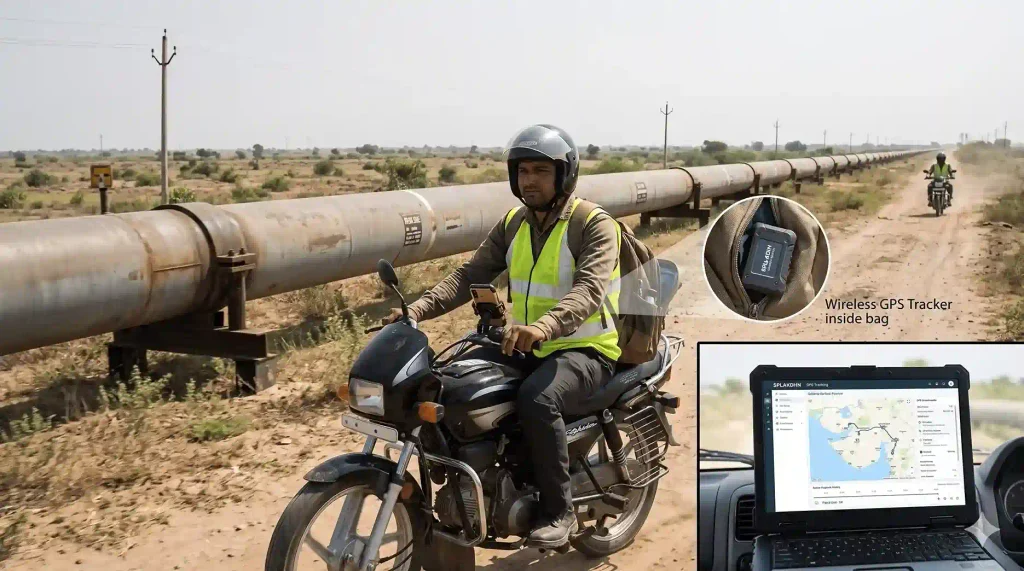
One of our clients in Gujarat used SPLAKDHN Wireless Personal GPS Trackers to support field staff monitoring across a fuel pipeline network spanning more than 300 km.
Staff members patrolled the pipeline routes using motorcycles or bicycles, carrying the wireless trackers inside their bags. The company reviewed GPS location history and movement to help assess whether scheduled patrol routes were being covered as expected.
Since the trackers were portable and wireless, they did not require permanent installation or vehicle wiring. This made them convenient for field personnel using different modes of transport.
How this setup helped:
- Review field staff location history and movement.
- Assess patrol route coverage using recorded GPS data.
- Monitor personnel without permanently installing devices on their vehicles.
- Support field operations across large industrial infrastructure networks.
Note: GPS location history can help assess recorded movement, but it does not independently confirm that every patrol or inspection task was completed.
Real-Time Tracking vs Battery Backup: What Should You Choose?
One of the most common buying mistakes is focusing entirely on battery life without considering how often the tracker needs to report its location.
Real-time tracking is useful when you want to follow a moving asset or understand where something is during a journey. However, frequent updates usually consume more power than less frequent reporting.
Consider two practical situations.
A transport business may need frequent updates for a valuable consignment travelling between cities. Knowing its changing location is more important than maximising the time between charges.
On the other hand, a company monitoring equipment that usually remains at a fixed site may not need equally frequent updates throughout the day. A more suitable reporting configuration could help reduce unnecessary battery consumption.
Neither approach is automatically better. The right choice depends on the consequences of delayed location updates and how often you can recharge the device.
Before buying, ask:
- How frequently can the tracker report its location?
- Can the tracking interval be configured?
- Does the device support movement alerts?
- How does the tracker behave when stationary?
- What battery backup should I expect with my intended settings?
These questions help you choose a tracker that meets your monitoring requirements rather than simply selecting the largest advertised battery life figure.
How to Extend the Battery Life of a Wireless GPS Tracker
You do not necessarily need a different device to improve battery performance. A few sensible habits can help you get more consistent results.
Use a Suitable Tracking Interval
If you do not need very frequent updates, check whether your tracker allows a less intensive reporting schedule.
For example, equipment that is usually stationary may not require the same reporting frequency as a vehicle travelling on a delivery route.
Only make this adjustment if the reduced frequency still meets your tracking and security requirements.
Charge the Device Before a Planned Journey
If you are using a wireless tracker for cargo, luggage or travel, check its battery status before departure.
Starting with a sufficiently charged battery reduces the chance of losing tracking capability during an important journey.
For business use, a simple charging checklist can be useful when